
By Malik Chohra
Loop engineering in React Native: an agent loop that ships a screen you can trust
Memory, rules, verify, schedule. The four-part loop, wired for a React Native app, with the checker most people skip.
You vibe-code a React Native screen. It compiles, it looks right in Expo Go, and three screens later you notice the onboarding flow lost its state on Android. The agent shipped faster than you could check it. That gap, between what got built and what you actually verified, is the whole reason to care about loops.
Loop engineering has been the phrase in every other AI newsletter this month. Before the hype eats it, here is what it actually means for a mobile app, and how to wire one that does not ship you a broken screen.
Where the term comes from
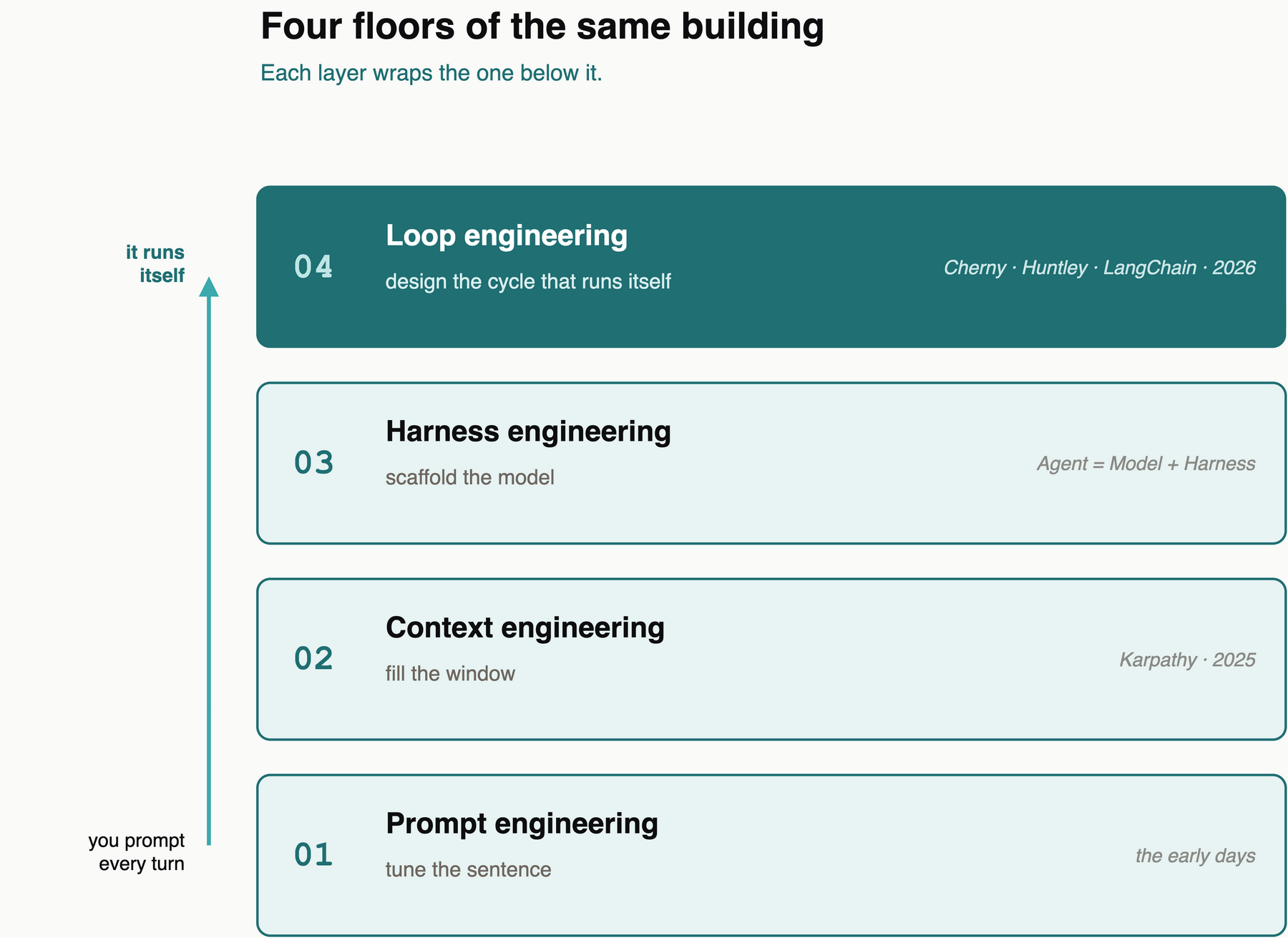
The lineage is short. Andrej Karpathy made the case for "context engineering" over "prompt engineering," because the real work is filling the context window with the right things for the next step. Then the agent crowd pushed it a floor higher. Boris Cherny, who built Claude Code at Anthropic, says he doesn't prompt Claude anymore, he runs loops that prompt Claude and figure out what to do. Geoffrey Huntley runs a coding agent inside a plain while loop he calls Ralph. Same shape everywhere: stop prompting the agent every turn, build the thing that prompts it for you.
The four parts of a loop
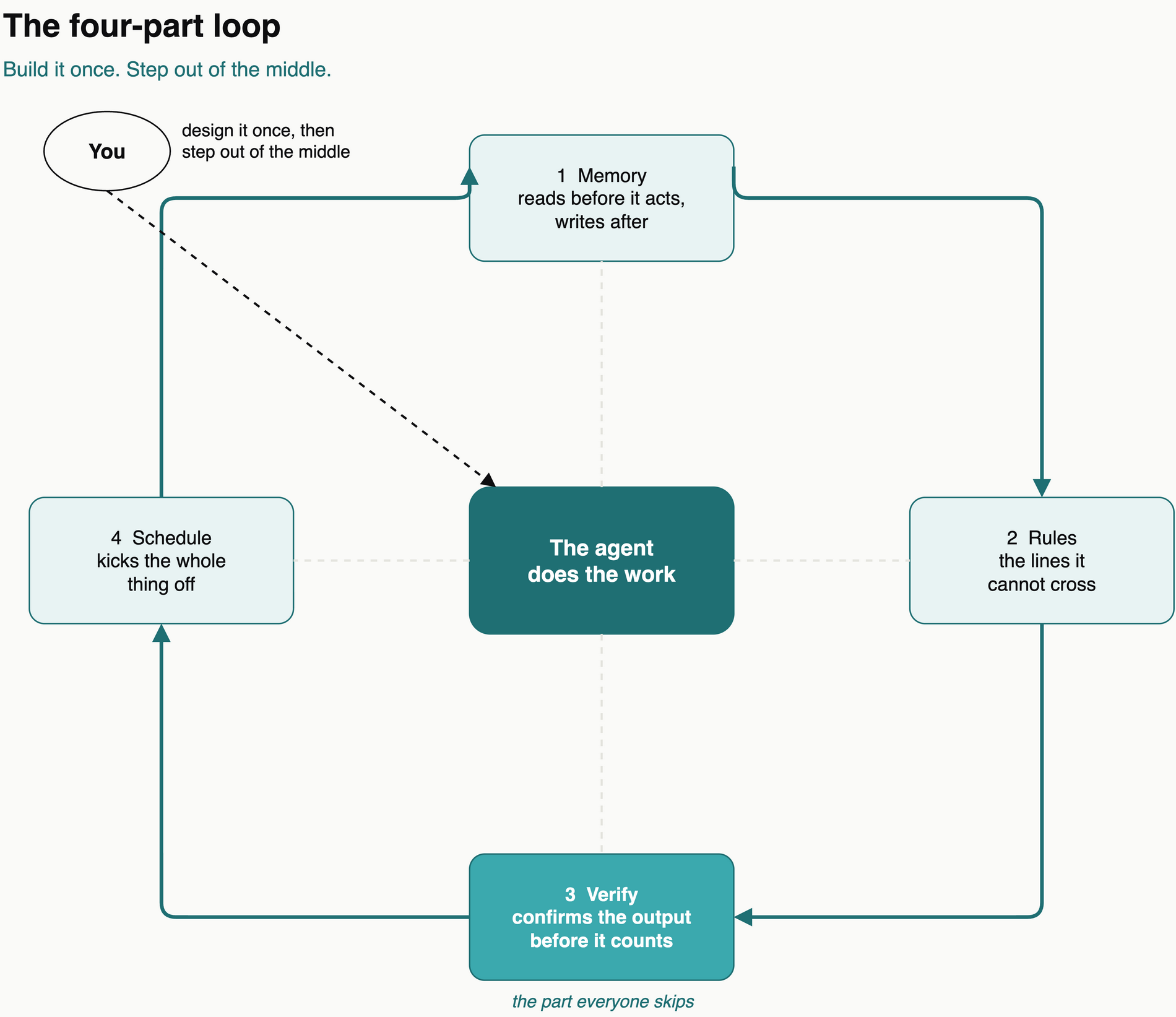
A loop is the thing that runs your work without you re-prompting it each time. It has four parts.
A memory it reads before it acts and writes to after. A set of rules it cannot cross. A verifier that confirms the output before it counts. A schedule that kicks the whole thing off. Memory, rules, verify, schedule. You wire them once, then you step out of the middle.
A worked example: a loop that adds a screen
Here is the loop running on something every RN app needs, adding a new screen. Watch where the verifier earns its place.
The goal, written as checkboxes before any code:
/goal Add a Profile screen to the app.
End-state (true/false checkable):
- [ ] navigating to "Profile" renders the screen (navigation test passes)
- [ ] the screen renders on iOS and Android (no red-box)
- [ ] npm test exits 0, no new TypeScript errors
Run 1. The worker reads the memory and rules, creates ProfileScreen, and reports success. The verifier ignores the report and runs the checks literally. The component renders fine in isolation, but the navigation test fails: the worker built the screen and never registered it in the navigator, so navigate("Profile") goes nowhere.
RESULT: FAIL
FAILED_CHECK: navigation test -> "Profile" route is not registered in AppNavigator
The worker thought it was done. In a normal vibe-coding session that ships, and you find it three screens later. The checker caught it on the spot.
The ratchet. The failure becomes a new rule, so the next run starts knowing it:
- Every new screen is registered in AppNavigator and has a navigation test. No exceptions.
Run 2. Worker registers the route, re-runs every check, all pass. The loop logs it and stops. Two runs, nobody in the middle, and the one bug that would have slipped through got caught by the part most people leave out.
The part everyone skips
The verifier is the one people leave out, and it's the one that matters most. Memory plus rules plus schedule gives you an agent that runs a lot. It doesn't give you one you can trust to run alone. Skip the verify step and you don't have a loop, you have a very confident intern with a cron job.
On mobile this bites harder than on the web, because "it renders" and "it renders on a real Android device" are different claims, and the agent only ever checks the first one. The verifier is where you encode the second.
What this needs to stand on
A loop is only as good as the rules and structure it builds against. If every run has to rediscover your navigator, your test setup, and your conventions, the loop spends its budget reinventing the project instead of moving it forward.
That is the boring foundation AI Mobile Launcher ships: a React Native and Expo boilerplate with the navigation, the test harness, and the conventions already written down, so the agent has rules to obey and a verifier to run from the first loop, not the fifth. You bring the goal, the structure is already there.
One warning before you wire one
The loop doesn't know what you're using it for. Two people build the identical setup and get opposite results. One uses it to move faster on work they understand deeply. The other uses it to avoid understanding the work at all. Build the loop like someone who intends to stay the engineer, not just the one who presses go.
*First published on Code Meet AI, where i write about building with AI as a mobile engineer, receipts included.*